Real estate marketing resource
How to Build Your AI-Powered Real Estate Marketing Stack
Learn the best AI tools for real estate and how to connect them into a simple, sustainable system. Build a real estate AI marketing stack that saves hours and grows trust.
On this page
- How to Build Your AI-Powered Real Estate Marketing Stack: 7 Steps for Consistent Leads
- What You’ll Learn
- Map Outcomes, Channels, and Cadence (10 minutes)
- Pick Your Creation Core, Voice, and Prompts (15 minutes)
- Create a Repurposing Engine for Multi-Channel Content (20 minutes)
- Schedule and Distribute With Light Automation (15 minutes)
- Connect CRM and Email for Lead Nurture (15 minutes)
- Track Performance and Close the Loop Weekly (10 minutes)
- Governance, Templates, and Digital Asset Hygiene (10 minutes)
- When Real Life Gets Messy
- Common Speedbumps (And How to Glide Past Them)
- Lock In the Principles That Keep This Sustainable
- 5 Principles That Separate Successful Agents
- Helpful Resources

How to Build Your AI-Powered Real Estate Marketing Stack: 7 Steps for Consistent Leads
Learn the best AI tools for real estate and how to connect them into a simple, sustainable system. Build a real estate AI marketing stack that saves hours and grows trust.
Last updated: Oct 28, 2025
Real talk: the hardest part of real estate AI marketing isn’t picking a shiny new app—it’s making your tools actually work together. Most agents I work with tell me the same thing: they want real estate social media marketing that feels consistent and authentic without spending nights wrestling with five logins and a dozen tutorials.
Here’s what actually works
Let’s make this manageable. The stack below comes from what I’ve set up for hundreds of professionals and it favors reliable, affordable tools, clean integrations, and repeatable workflows that support creation, real estate content repurposing, and email marketing. You probably already have 70% of what you need—the rest is choosing one tool per job and connecting them with simple automations.
After helping hundreds of real estate professionals, here’s what I’ve learned: the most successful agents keep their stack small, integrate it cleanly, and protect their calendar. One of our top performers moved from scattered apps to a clean seven-step system and turned a single market update into Reels, LinkedIn articles, Shorts, TikToks, a client email, and two blog posts in 30 days—more engagement, more replies, less effort.
What You’ll Learn
- 💻
The essential AI tools that actually fit a real estate marketing strategy
- 🔗
How to integrate your apps so content flows without manual copy-paste
- ♻️
A workflow for real estate content repurposing across multiple platforms
- 📈
A practical tracking system that shows what works and what to cut
Let’s build your stack—without the overwhelm
Before we dive in: you probably already have everything you need to start. The key isn’t a perfect setup—it’s a simple system you can stick with. Start minimum viable, then optimize once you see momentum.
I’ll walk you through each step with clear time estimates and practical examples so you can put this into play today.
Your 7-Step AI Stack for Consistent Leads
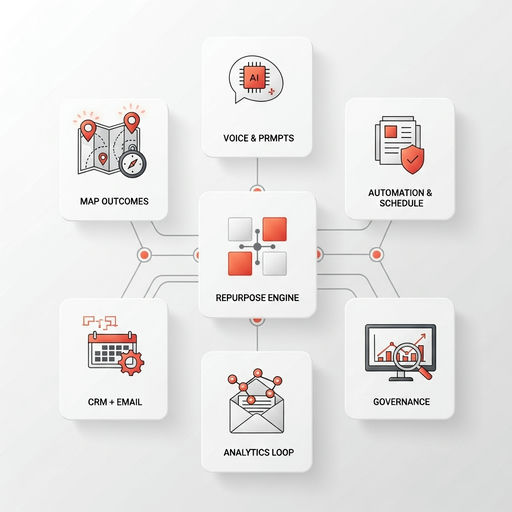
A quick visual of the simple, sustainable workflow we’re about to build—one tool per job, connected cleanly.
Map Outcomes, Channels, and Cadence (10 minutes)
Before tools, decide what results matter. Pick one primary outcome for the quarter—maybe increasing listing inquiries, boosting open house attendance, or booking more buyer consults. Define your property content strategy by channel using simple pillars like weekly market updates, listing spotlights, community features, and client stories. Then set a lightweight content calendar you can actually sustain, such as two short videos, two carousels, one email, and one blog per week. If you want a quick structure, align your pillars to audience segments and do a fast audit with our guides on content pillars for agents and the 10-minute content audit.
Pick Your Creation Core, Voice, and Prompts (15 minutes)
Choose one AI writing partner—ChatGPT, Claude, or Gemini all work—and commit to it. Add a living brand voice guide covering tone, phrases you actually say, local nuances, compliance notes, and five example posts that sound like you. Build a prompt library for market updates, listing descriptions, neighborhood guides, and email follow-ups. This becomes the engine for both your short-form social and your professional long-form posts. Grab our voice guide template and the prompt playbook to speed this up.
Create a Repurposing Engine for Multi-Channel Content (20 minutes)
Record one anchor asset per week—a five-minute market update or a listing walkthrough—and let AI turn it into a month of posts. With a clear workflow, creating month-long content from one recording is absolutely realistic. Use Descript or Riverside for transcripts, Opus Clip or CapCut for short cuts, Canva for carousels, and your LLM for captions. Convert the transcript into Instagram carousels, LinkedIn articles, YouTube Shorts, TikTok property tours, and a client email. For reference, see the 30-day repurposing map and AI video best practices.
Schedule and Distribute With Light Automation (15 minutes)
Pick one scheduler—Buffer, Later, Metricool, or Hootsuite—and load your multi-channel content in one sitting. Batch captions and make quick platform-specific edits for property Reels, Facebook posts, LinkedIn articles, YouTube Shorts, and TikTok descriptions. Add UTM tags so analytics connect later. Keep a reusable library of hooks, CTAs, and local hashtags to stay fast and consistent. If you want plug-and-play options, try our caption formulas and this practical hashtag guide.
From One Video to a Month of Content

This is the leverage point: one anchor asset feeds every channel when your stack is connected correctly.
Connect CRM and Email for Lead Nurture (15 minutes)
Tie your scheduler and lead forms to your CRM using Zapier or Make so follow-up happens automatically. Whether you use Follow Up Boss, kvCORE, HubSpot, or a lightweight Mailchimp or ConvertKit setup, create segments for sellers, buyers, landlords, and past clients, then trigger nurtures when someone watches a video, downloads a guide, or clicks a market update. Keep emails short, local, and tied back to your social content. Start with our simple CRM automations and build from there.
Track Performance and Close the Loop Weekly (10 minutes)
Define success across three tiers so you’re not guessing. Inputs confirm whether you published the five planned items. Engagement shows saves, replies, and average watch time. Outcomes focus on consults booked, listing inquiries, and email replies. Use native platform analytics plus GA4 for site traffic, or pipe everything into one Looker Studio dashboard. Each week, ask which format and topic drove the most action, cut low performers, and double down on winners. For structure, use our framework on measuring social media ROI.
Governance, Templates, and Digital Asset Hygiene (10 minutes)
Create a simple SOP library so you or an assistant can run the system the same way every week. Standardize file names for property marketing—think listing-address_date_version—and keep raw video, edited clips, thumbnails, and captions in one shared folder. Preserve your branding with Canva templates for carousel styles and video covers. Once a month, run a content audit and retire anything outdated, and if you collaborate, define who drafts, who approves, and who posts. This keeps your brand consistent even when you get busy.
When Real Life Gets Messy
Let’s be honest: even clean systems hit speedbumps. The difference between successful agents and frustrated ones is having simple fixes ready when things wobble.
Here are the most common issues I see—plus the no-drama solutions that get you moving again.
Common Speedbumps (And How to Glide Past Them)
😅 Too many apps, too many subscriptions
No problem at all! This happens to everyone. Consolidate to one tool per job—creation, video edits, scheduling, CRM, analytics—and cancel anything that overlaps. If a feature isn’t used weekly, it goes. Your stack should fit on a single note card so it’s easy to run even on your busiest weeks.
🤔 AI output sounds generic or off-brand
Easy fix. Create a brand voice doc with tone, phrases, neighborhoods, and five sample posts that sound like you. Feed local data like recent sales and landmarks into your prompts. Edit your core prompts to include your point of view, then run short test posts and save high performers as templates you can reuse.
🧱 Integrations keep breaking
Set Zapier error alerts to email you when a zap fails and keep a manual fallback—a spreadsheet you can paste captions into when needed. Review connections monthly and document settings so you can rebuild quickly if a tool changes permissions. It’s normal; you’re just building resilience into the system.
🔒 Privacy concerns with client data
Protect trust first. Avoid uploading private client info into public AI tools. Anonymize addresses and names, focus on market trends and property features, and store PII only in your CRM. When in doubt, keep sensitive details out of prompts and keep your examples generic.
Lock In the Principles That Keep This Sustainable
You’ve got the steps and the fixes. Now, a few core principles will help you maintain this rhythm long-term.
Keep the system small and repeatable; it’s easier to run, easier to improve, and far more consistent than chasing every new feature.
Your AI Stack, Simplified
These principles keep your stack lightweight, trustworthy, and effective—week after week.
5 Principles That Separate Successful Agents
The best AI tools for real estate work when your system stays focused and repeatable. Let these principles guide how you choose, connect, and improve your stack:
- ✅
Keep a minimum viable stack—one tool per job—then optimize later
- ♻️
Create one anchor asset each week, then repurpose into 5–7 outputs across platforms
- 🗃️
Protect your brand voice with a living style guide and reusable prompts
- 📊
Track inputs, engagement, and outcomes weekly to guide decisions
- 🔁
Build for real estate content repurposing, not one-off posts—start here: 30-day real estate repurposing plan
Your Next Best Step
Ready for a quick win? Choose your anchor asset for this week, set your single scheduler, and connect one automation to your CRM.
If you want templates and walkthroughs, these resources will help you move faster with confidence.
Helpful Resources
Kyle Raineri
CEO of RealEstateContent.ai
Kyle Raineri is the CEO and founder of RealEstateContent.ai, helping real estate agents navigate modern marketing tools while assembling sustainable AI marketing stacks that work together without chaos. With expertise in both traditional relationship-building and AI-powered content strategies, Kyle helps agents leverage technology to amplify their genuine expertise without compromising their professional integrity or personal values.