

How to Create 30 Days of Real Estate Content in Just 2 Hours: 5 Steps for a Calm, Consistent Presence
Last updated: Oct 28, 2025
Content can feel overwhelming when you’re already juggling showings, contracts, and client calls. Most agents I work with tell me the same thing: “I don’t have time to create content every day.” You’re not alone—social media can feel like one more thing on a very full plate.
Here’s what actually works
After helping thousands of real estate professionals, I’ve learned that the fix isn’t more time—it’s a simple, repeatable system. Batch your content in focused sprints, use proven templates, and schedule everything at once. You probably already have everything you need—a phone camera, a few listing photos, your MLS stats, and a basic brand look.
One of our top performers went from posting twice a month to five times a week by using five templates, batching the copy in one session, and scheduling a month in advance. The result? Steadier inbound DMs, more replies to market updates, and a calmer headspace. Let’s build that kind of momentum for you.
What You’ll Learn
-
A five-step content batching process that fits into a two-hour window
-
How to use templates to produce 30 posts without starting from scratch—plus a simple social planning approach
-
Time-saving tools for copy, visuals, and scheduling that keep you consistent
-
A plug-and-play real estate content calendar you can reuse every month
Let’s make this easy
Before we dive in: you don’t need a perfect setup. The key is a simple system you can stick with that delivers consistent visibility without daily effort.
We’ll keep this coffee-break friendly and focused on sustainable real estate content creation that works in today’s feeds. I’ll guide you, step by step.
Your 2-Hour Content Batching Framework
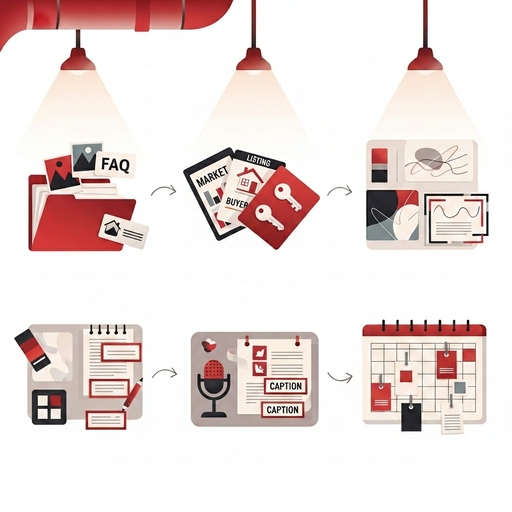
A quick look at the five steps you’ll follow to create 30 days of content in a single focused session.
Audit and Collect Your Content Bank (15 minutes)
Real talk—most agents already have a month of content hiding in plain sight. In one quick sweep, pull everything into a single folder: three listing photo sets, one client quote, three FAQs you answer weekly, two neighborhood snapshots, and current market stats. This lightweight content audit plants the seeds for repurposing later and keeps you from starting cold. If it takes longer than 15 minutes, you’re overthinking it. For a simple checklist, use this quick audit guide for agents, and if you want help turning stats into posts, follow this walkthrough. Your aim here is momentum, not perfection.
Pick 5 Templates and Map 30 Posts (20 minutes)
Here’s what actually works: choose five repeatable templates that fit your voice and market—Market Update, Listing Spotlight, Buyer Tip, Seller Tip, and Local Spotlight. Then map six variations of each to reach 30 posts. Think six quick buyer tips that read like captions, six local spots near listings, six seller prep tips, six market updates each with one stat, and six listing spotlights rotating image, carousel, and short video. This is social media content planning for realtors at its simplest. Grab ready-to-customize layouts in these social templates, and if you like a steady weekly rhythm, use this structure. Templates remove decision fatigue—the agents who stay consistent lean on them every month.
Mid-Process Snapshot: Captions + Templates Aligned

At this point you’ve banked assets and mapped posts—next you’ll draft captions in fast passes so everything flows.
Batch Write With Prompts or Voice Notes (35 minutes)
Set a 35-minute timer and draft all 30 captions in a single doc. Work in passes to keep momentum high. Pass one is headlines only, like “Buyer Tip 2: Don’t skip the inspection.” Pass two adds one sentence of context and a clear call to action such as “Save this for your next walkthrough” or “Comment if you want the full checklist.” If talking is easier than typing, dictate voice notes on your phone and transcribe. This is where real estate content repurposing shines—turn last week’s open house questions into six FAQ posts, split one blog into five carousels, and trim a listing video into three short clips. For prompt ideas that keep your voice intact, use these AI prompts, and for faster writing with your phone, try this voice-to-text guide. Keep it simple, clear, and helpful for stronger engagement without extra effort.
Design Once, Reuse Forever With a Mini Brand Kit (25 minutes)
You don’t need to be a designer to look professional. Choose two brand colors, one headline font, one body font, and place your logo in the corner at about 70% opacity. Save five Canva templates aligned to your Step 2 choices—one per template type. Then it’s a quick swap: update photo frames, tweak the headline, paste your caption, and you’re done. For listing carousels, aim for one compelling exterior, one interior, and one lifestyle detail per post, and keep on-image text under 20% for readability. If you want a fast brand kit setup, follow this Canva brand kit process, and to maximize reach on property posts, use this optimization guide. This approach supports content amplification across Instagram, Facebook, and LinkedIn without redesigning each post.
Schedule on a Simple Real Estate Content Calendar (25 minutes)
Now plug everything into a content calendar so you can set it and forget it. Use one sheet with columns for Date, Platform, Template Type, Asset Link, Caption, and Status, and color-code your five templates to see the month at a glance. Schedule inside Meta Business Suite for Facebook and Instagram, use LinkedIn’s native scheduler for professional updates, and add YouTube Shorts or TikTok if you have video assets. Front-load the first two weeks, then leave three open slots for timely posts like new listings or sold updates. If you need a plug-and-play calendar, grab this template, and for step-by-step scheduling, use this walkthrough. You just built a reliable real estate content scheduling system that frees up your week.
When real life disrupts the plan
Life happens—listings change, rates move, and some weeks get loud. The difference between agents who stay consistent and those who stall is protecting one two-hour batching block and keeping a small evergreen buffer ready to deploy.
Here are the common speedbumps and the simple fixes I recommend.
Common Speedbumps (And How to Glide Past Them)
😅 I ran out of ideas halfway through
No problem at all! This happens to everyone. Open your sent emails or recent texts and pull three client questions—each becomes a post. You can also split one longer piece into multiple posts, like a buyer guide into five tips. If you have a strong listing video, create a teaser clip, a photo carousel, and a behind-the-scenes story. That’s how you turn one asset into a month of content without extra recording.
🤔 The market changed and my month is off
Keep three flexible calendar slots labeled “Swap.” Replace them with timely market updates or urgent client education when needed. If there’s a major rate move, record a 30-second explainer and drop it into those slots across platforms. Your system stays intact, and your content stays relevant.
😐 My posts feel repetitive
Rotate formats, not just topics. Take a single tip and share it once as a static image, once as a carousel with three micro-points, and once as a 20-second vertical video. Swap the call to action each time—save, comment, or DM for a checklist—to keep engagement fresh without reinventing your content.
The principles that keep you consistent
You’ve got the steps and solutions. Now anchor the system with a few core practices so it stays durable month after month.
Master these five principles; they’ll reduce stress, protect your time, and help your presence compound.
Key Principles for Month-Over-Month Consistency

A one-glance reminder of the habits that make this system sustainable long term.
5 Principles That Keep You Consistent
Between us, this is what separates agents who post for a week from the ones who build a steady presence that compounds.
-
Batch work in time boxes, not open-ended sessions
-
Use five templates for 80% of output, then personalize the last 20%
-
Repurpose before you write new—FAQs and market updates are gold
-
Schedule a month at a time with a simple calendar so posting never depends on your daily mood
-
Review monthly for top performers, then double down next cycle—use this quick review method
Your next smart move
Ready for a quick win? Protect a two-hour slot on your calendar this week, pick your five templates, and draft headlines for 30 posts. You’ll feel the momentum immediately.
If you want to go deeper or save even more time, these resources make the next steps straightforward.
Helpful Resources