

The Non-Technical Agent’s Guide to Using AI for Real Estate Marketing
Last updated: Oct 29, 2025
AI can feel overwhelming when you’re already juggling lead follow-ups, showings, and staying active on social. Most agents I work with tell me the same thing: “I know AI could help, but I don’t have time to learn a whole new tech stack.” If that’s you, you’re absolutely not alone.
Before we dive in
Here’s the thing: the agents who succeed with AI aren’t the most tech-savvy—they’re the ones who use simple tools consistently for real marketing results. You don’t need code, jargon, or hours of training to see a difference; you just need a clear workflow that fits your day.
After helping thousands of real estate professionals streamline their marketing, I’ve learned what actually works in the real world. In this guide, we’ll keep it practical and time-conscious so you can show up online while still prioritizing clients and closings.
What You’ll Learn
-
Exactly what AI can—and can’t—do for real estate marketing, including where your voice still matters most, with examples like AI-written social captions and when to pair with automation tools.
-
How to choose the right beginner-friendly tools without trial and error using our task-first approach and this AI tools guide for agents.
-
A 10–15 minute weekly workflow that turns one theme into multiple posts using ChatGPT and your scheduler—complete with prompt ideas and simple scheduling via REC’s scheduler.
-
Best practices to keep it simple and authentic, plus quick fixes for common speedbumps like robotic tone and missed weeks.
Let’s turn this into action
No problem at all if AI has felt intimidating—this happens to everyone. You probably already have everything you need to see results: one writing tool and one scheduler. We’ll keep it light, fast, and doable.
I’ll walk you through a weekly rhythm that fits busy agent life. Think “repeatable” over “perfect,” and you’ll be golden.
Simple Weekly AI Marketing Flow
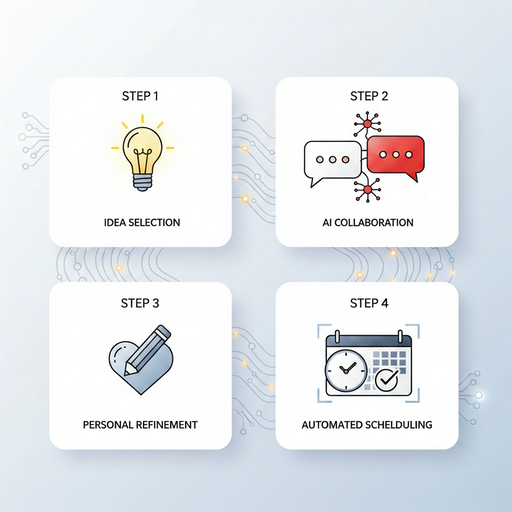
A quick, repeatable loop you can run in 10–15 minutes: pick a theme, generate with AI, add one human touch, and schedule.
Pick Your Weekly Theme (2 minutes)
Start small so momentum feels easy. Choose one focus for the week—maybe a new listing, a neighborhood spotlight, a quick “why I love this area” story, or a recent client win. If you’re unsure what to pick, scan your recent texts and emails; the questions you already answer for clients make perfect post themes because they’re timely, relevant, and in your voice.
Prompt AI to Create Posts (5 minutes)
Open your writing tool and keep the prompt plain-English. Try, “Write 3 social media captions about a 3-bed, 2-bath home in [city] at $425,000. Emphasize lifestyle, not just facts.” If you’re stuck for angles, ask for ideas first: “Give me 5 Instagram post ideas for a friendly neighborhood-focused agent in [your city], casual tone.” In seconds you’ll have a batch to work with—no blank page, no overthinking.
Customize Even Just One Line (2 minutes)
This is where trust happens. Add one detail that only you would know: the café around the corner, a quick quote from your client, a neighborhood street name, or your personal take on who the home is perfect for. That tiny human touch flips a decent AI caption into something relatable and on-brand—fast.
Schedule or Post Right Away (3–5 minutes)
Block 15 minutes on your calendar each week and stack posting right there. If you use a scheduler, log in and queue your content through your connected accounts using the simple flow in this setup guide. Prefer to post natively? No problem—paste it in, attach a real photo or quick phone video, and you’re done for the week.
When the wheels wobble a bit
Consistent systems don’t mean perfect weeks. The difference-maker is having friendly fixes ready so you can get back on track in minutes, not hours.
Here are the most common speedbumps and how to glide past them with zero stress.
Common Speedbumps (And How to Glide Past Them)
😅 “I asked ChatGPT to write a post, but it sounded robotic.”
No problem at all! This happens to everyone. Use your post as a base and add a line like “Here’s what I tell my clients…” or “In [city], this matters because…” That one sentence injects your voice and local context instantly. You can also prompt, “Rewrite in a warm, conversational tone for a community-focused real estate agent.”
🙄 “I’m not sure if the post fits my brand.”
Ask your tool to adjust the tone: “Make this sound like a friendly, knowledgeable agent who cares about clients and the local community.” Keep a few tone prompts saved so it’s one click to stay consistent. Over time, this becomes your shortcut library—grab, paste, tweak, done.
😨 “I forgot to post all week!”
You’re human. Open your AI tool and type, “Remind me of the best things to post this week as a real estate agent.” Pick one, post it, and move on. If you can, build a tiny backup queue of evergreen posts so you’re never starting from zero on busy weeks.
The principles that keep things simple
Tools come and go, but a few steady habits make AI genuinely useful for busy agents.
Master these five and your marketing will stay consistent; they’re practical, sustainable, and built for real life.
AI for Real Estate: Best Practices at a Glance

A one-glance reminder to keep your system light, authentic, and consistent.
5 Simple Principles for Using AI Without Getting Overwhelmed
Think of these as your guardrails. They keep your marketing helpful and human, no matter which tools you use.
-
AI helps—you still lead. Use it to get unstuck and speed things up, but keep your perspective front and center. Your clients follow you, not a robot.
-
Pick 1–2 tools max. Start with a writer (e.g., ChatGPT) and a scheduler. Choose from this agent-friendly tools list and stop there until it’s second nature.
-
Work weekly, not daily. Fifteen focused minutes beats scattered daily attempts. Batch a few captions and schedule them in one go.
-
Add one human touch. A neighborhood name, a quick client quote, or your personal take makes engagement jump. For wording help, try these caption templates for ChatGPT.
-
Save your best prompts. Build a simple prompt library so you can grab, paste, and tweak. If you want a bigger jumpstart, check out the 30-day content system.
Your next smart move
Set a weekly 15-minute reminder and run the four-step flow once. That’s it. The goal isn’t perfect posts—it’s consistent presence that sounds like you.
If you want templates and time-savers to make this even easier, these resources will help you plug in fast.
Helpful Resources